Trends
The 90s AI Photo Trend on ChatGPT: The Exact Prompt That Works
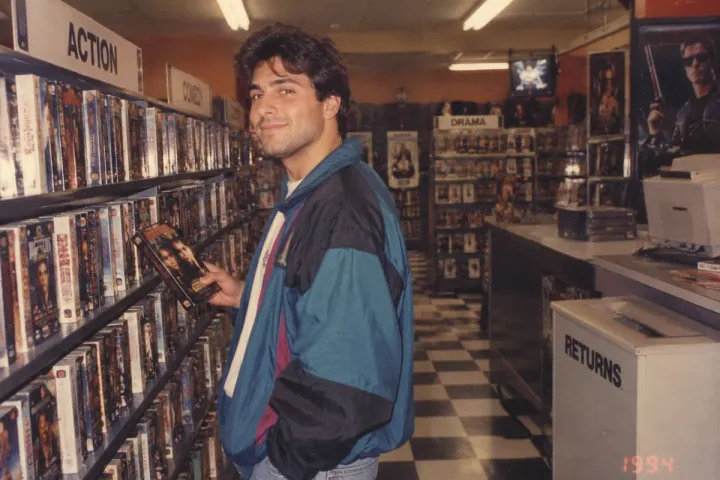
Everyone chasing the 90s AI photo trend on ChatGPT hits the same wall. The results come out too smooth, too modern, or ChatGPT simply refuses the request when a real face is involved.
The trend blew up first on Gemini, where photorealistic vintage recreations landed almost on the first try. ChatGPT plays by different rules. Its image model leans harder on caution around real human faces, so the exact same prompt that works on Gemini often gets watered down or rejected outright here.
This guide gives you the ChatGPT-specific version of the prompt, built around a setting instead of a face-first description, plus the wording tweaks that keep the output from looking like a AI render.
The Exact Prompt for ChatGPT
Attach a clear, front-facing photo of yourself, then paste this:
Turn this photo into a candid snapshot taken inside a 1990s American video rental store. Subject: keep the person’s face and features from the attached photo, natural unposed expression, standing in one of the aisles. Setting: rows of VHS tapes on shelving, hand-written cardboard genre signs, checkered tile floor, fluorescent overhead lighting, a return bin near the counter. Wardrobe: casual early-to-mid 1990s clothing, an oversized graphic tee or a windbreaker jacket. Camera and film quality: visible film grain, slightly warm color cast, on-camera flash with mild red-eye, soft focus, small corner timestamp reading 1994. Avoid: modern signage, digital displays, smartphones, airbrushed skin, studio lighting, visible store brand names or logos.
Copy Prompt
✅ Naming the location first (video rental store) gives ChatGPT a scene to build around instead of a face to scrutinize, which lowers the chance of a refusal
✅ “Keep the person’s face and features from the attached photo” works better than re-describing the face, since ChatGPT already has the reference image
❌ Never write “photorealistic” in the prompt. ChatGPT associates that word with deepfake requests and blocks more often when it appears
Why ChatGPT Handles This Differently Than Gemini
ChatGPT’s image model runs a stricter check on prompts that combine a real uploaded face with detailed physical descriptions of that same face. Gemini tends to accept this combination more freely.
The workaround is to shift the weight of the prompt. Instead of describing the person, describe the room. ChatGPT spends its attention on the video store, the lighting, and the grain, and treats the face as a simple carry-over from the photo.
For the original version of this trend, built specifically around Gemini’s looser handling of real faces, check out The 90s AI Photo Trend: How to Recreate It With Gemini.
Tips to Make the Result Look Authentic
- Ask for “one slightly blurry hand,” since real candid photos from a moving subject rarely came out perfectly sharp
- Add “flash reflection on a nearby glossy surface,” a detail almost every disposable camera photo from that decade has
- Skip any mention of a specific store chain. Generic descriptions keep the prompt from tripping trademark-related filters
Run the prompt two or three times if ChatGPT returns something that still reads as digital. Small rewording, like swapping “video rental store” for “video store aisle,” sometimes changes the outcome more than adjusting the lighting details.
ChatGPT vs. Gemini for the 90s AI Photo Trend
| Feature | 🤖 ChatGPT | 🎨 Gemini |
|---|---|---|
| 👤 Real face handling | ⚠️ Stricter, needs indirect wording | ✅ More permissive |
| ⏱️ Average attempts needed | 2 to 3 | 1 to 2 |
| 🎞️ Film grain accuracy | ✅ Strong | ✅ Strong |
| 💰 Free tier available | ✅ Yes | ✅ Yes |
| 🚫 Refusal rate on first try | Higher | Lower |
| 🖼️ Best use case | Scene-heavy shots (stores, arcades) | Close-up portrait shots |
FAQ
Does ChatGPT refuse this prompt every time?
No. Refusals happen more often than on Gemini, but leading with the setting instead of the face lowers the refusal rate significantly. If it fails once, rephrase the location detail and try again.
Can I use the same prompt from the Gemini version?
Not word for word. The Gemini prompt describes the face in detail, which ChatGPT reads as a stricter request. Use the version above, built around the setting instead.
Why does my photo still look too clean?
ChatGPT sometimes over-corrects toward polish. Adding “slightly underexposed” and “visible flash glare” to the prompt pushes it toward a rougher, more authentic look.
Which AI tool gives better results for this trend overall?
Gemini currently produces convincing results faster and with fewer refusals. ChatGPT catches up when the prompt centers on a detailed scene rather than a close-up face.
Try It Before the Trend Fades
Pick a clear photo, paste the prompt above into ChatGPT, and lean on the video store setting to carry the vintage feel. If the first result looks off, reword the scene before touching the wardrobe or lighting details.