Trends
The 90s AI Photo Trend: How to Recreate It With Gemini
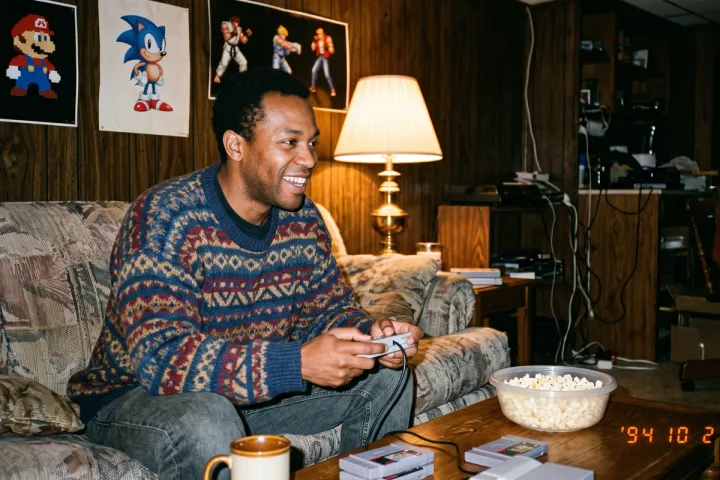
The 90s AI photo trend is spreading fast, and Gemini is turning out to be the most consistent tool for pulling it off. One photo, one detailed prompt, and you get a convincing throwback snapshot in seconds.
Unlike other AI tools, Gemini handles real faces combined with vintage scene details without tripping safety filters as often. That makes it the easiest starting point if you want a quick, reliable result.
Below is the exact prompt, structured the way a prompt engineer would build it, plus the small adjustments that make the difference between a convincing photo and an obviously fake one.
The Exact Prompt for Gemini
Attach a clear, front-facing photo of yourself, then paste this:
Recreate this photo as a real 1990s point-and-shoot snapshot (not 1980s). Subject: an adult man with brown/tan skin tone, natural candid expression, sitting on a couch. Action: playing a classic gray home video game console, holding a boxy controller with both hands, eyes focused on the TV. Setting: 1990s living room, wood paneled walls, a warm yellow lamp, a bowl of popcorn and a mug nearby, generic vintage video game posters on the wall. Wardrobe: bold patterned knit sweater typical of the early-to-mid 1990s. Camera and film quality: visible film grain, warm amber-orange color cast, harsh direct on-camera flash, natural skin texture, slightly soft focus, minor motion blur, small timestamp in the corner. Avoid: modern consoles, modern furniture, digital sharpness, studio lighting, airbrushed skin, visible logos or brand names, anything from the 1980s specifically.
Copy Prompt
✅ Breaking the prompt into Subject, Action, Setting, and Wardrobe blocks keeps Gemini from skipping details buried in a long paragraph
✅ “Not 1980s” locks the decade, since Gemini sometimes blends neighboring eras when you only say “90s”
❌ Skip brand names entirely, generic descriptions like “gray home video game console” work better than naming one
Why Gemini Handles This Better Than Other Tools
Real faces combined with detailed vintage scenes sometimes trigger stricter safety filters on other AI tools. Gemini tends to process this exact type of request without blocking it, which makes it the more reliable option for this specific trend.
That does not mean every result comes out perfect on the first try. Small wording adjustments still matter.
If ChatGPT is your only option, the approach needs to change. Check out The 90s AI Photo Trend on ChatGPT: The Exact Prompt That Works for the scene-first version of the prompt built to get past its stricter filters.
Tips to Make the Result Look Authentic
- Ask for “slight underexposure” instead of even lighting, real flash photos from that era were rarely well balanced
- Request a “cropped, off-center composition,” since candid 90s shots were almost never centered
- Never add “smooth skin” or “perfect lighting” to the prompt, that instantly makes the result look digital
Run the prompt twice if the first output feels too polished. Even with identical wording, Gemini varies its output, and a second attempt often nails the grain and flash texture better than the first.
FAQ
Does Gemini require a paid subscription for this?
No. Gemini offers a free tier that handles this type of prompt well. Results are consistent enough for casual use, though a paid plan may offer faster processing during high traffic periods.
Why did my photo come out too clean?
Overly sharp or well-lit source photos confuse the AI’s sense of “vintage.” Use a photo with natural, slightly uneven lighting for a more authentic starting point.
Can I use this prompt with any photo?
Yes, but front-facing, clearly lit photos produce the most convincing results. Heavily filtered or low-resolution photos often produce distorted or unnatural output.
Try It Before the Trend Fades
Grab a recent selfie, copy the prompt above into Gemini, and post your result while this wave is still peaking.